- For most marketing sites, subfolders such as /de/ are the simple choice: easy to set up, low upkeep, one domain.
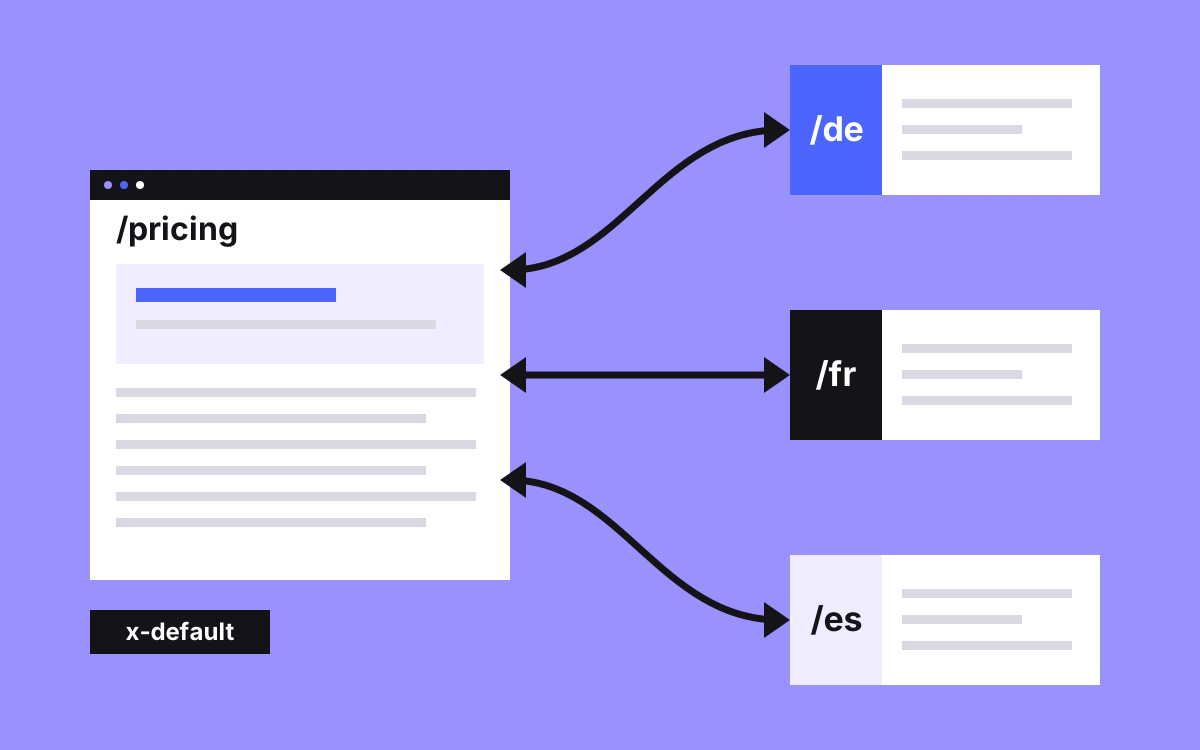
- Every version must list itself and every other version, with full URLs. If two pages do not point at each other, Google ignores the tags.
- A translated page should have its own canonical. Pointing it at the main language is a common way to lose it.
- Do not redirect by IP or assumed language. Link to the other versions so people and crawlers can reach them all.
- Translate the main content, not only the menu. Google treats pages as duplicates if only the header and footer change.
The short answer
For most marketing sites, use subfolders such as example.com/de/, add hreflang tags to every version, give each version its own canonical, and link between versions in place of automatic redirects. Translate the main content of each page. Most international problems come from breaking one of those rules, and every one can be checked.
The two Google pages to read are localised versions of your pages and managing multi-regional sites. If you are on Webflow, our Webflow Localization guide covers the setup in detail.
Choosing a URL structure
This table summarises the trade-offs Google lists, with our rule in the last column.
| Structure | Good | Costs | Our rule |
|---|---|---|---|
| Subfolder: example.com/de/ | Easy to set up, low upkeep | One server location, sites are less separated | The default for most marketing sites |
| Subdomain: de.example.com | Easy to set up, can use other servers | People cannot tell if "de" is a language or a country | When a local team runs its own stack |
| Country domain: example.de | Clear country signal | Costly, more infrastructure, some have strict rules, one country only | When a country is a real business of its own |
| Parameter: site.com?loc=de | None worth having | Google does not recommend it | Do not use |
Whichever you pick, keep it for the whole site. Mixing structures makes the tags and reports harder to manage. See also subdomain vs subfolder.
Language or country?
Decide what you are targeting before you make any URLs.
- Different language: a page per language, such as
/de/and/fr/. This is the common case. - Same language, different market: make
/en-gb/and/en-us/only when something real differs, such as prices, delivery, legal text or proof.
Google says language versions count as duplicates only if the main content is in the same language. So two English pages with the same text are duplicates. If you keep both, Google advises choosing a preferred version with canonical and hreflang tags. If nothing real differs, keep one page.
How hreflang works, with an example
Say you have a pricing page in English and German, with English as your fallback. Both pages carry this same set of tags:
<link rel="alternate" hreflang="en" href="https://example.com/pricing" /><link rel="alternate" hreflang="de" href="https://example.com/de/pricing" /><link rel="alternate" hreflang="x-default" href="https://example.com/pricing" />
The rules, from Google:
- Self reference. Each version lists itself as well as all the others.
- Return links. If page A points to B, B must point back to A. If they do not, the tags are ignored.
- Full URLs. Include
https://. A path such as/de/pricingdoes not qualify. - Codes. A language, with an optional region:
deoren-GB. A country alone is invalid.bemeans Belarusian, not Belgium. - One method. Page tags, HTTP headers or the XML sitemap. Using more than one brings no Search benefit.
- x-default is the fallback when no listed language matches. It suits a language selector page or your main version.
Google also says it does not use hreflang or the HTML lang attribute to work out a page's language. It reads the page itself, so the content must really be in that language. Keep your lang attribute correct anyway, for screen readers and browsers.
What breaks most often
| What goes wrong | What happens | Fix |
|---|---|---|
| Page A points to B, B does not point back | Google ignores the tags | Generate the whole set from one list of locales |
| Relative URLs in the tags | They do not qualify | Use the full URL with https |
| Canonical on /de/ points to the English page | You are telling Google to prefer the English page | Each language version gets a canonical to itself |
| Only menus and footer are translated | Google treats the pages as duplicates | Translate the main content, or do not publish that page yet |
| Redirect by IP or browser language | People and crawlers can miss versions | Link to versions, and let people choose |
| en-UK used as a code | Google ignores reserved codes such as UK and EU | Use en-GB |
| Tags point to redirects, noindex pages or 404s | In our view, a broken signal | Check every target returns 200 and is indexable |
| Two languages on one page | Google advises one language per page | Pick one for the content and the navigation |
| A translated slug changes with no redirect | The old URL dies | Add a 301 redirect |
Redirects and the language switcher
Google advises against sending people to another version based on their assumed language, because this can stop people and search engines from seeing all your versions. It also says not to adapt content by IP: location checks are unreliable, most crawling comes from the US, and Google does not vary where it crawls from. A German page shown only to German IPs may never be seen at all.
So link the versions together:
- A language switcher on every page, using real links, going to the same page in the other language.
- If you want to help people, show a small banner suggesting their language, without moving them.
- Label each language in its own language: Deutsch, not German.
Local signals beyond translation
Google lists local addresses and phone numbers, local language and currency, and links from local sites among the signals it reads. These also help the person reading the page.
- Prices and currency where you really can bill that way. Say plainly what you bill in. Our note on the currency we bill in is one example.
- Proof that fits the market, only if it is true.
- Forms and routing. A lead in German should reach someone who can reply in German.
- Consent and legal pages. Rules differ by country. This post is not legal advice, so ask someone qualified for each market.
Doing it in Webflow and Astro
Webflow. Localization puts each secondary locale in its own subfolder on the same domain and can generate hreflang tags for you. It is a paid add-on, and details change, so check the current Webflow docs. Our guide has a launch checklist, and Webflow development is where we build it.
Astro. You control the HTML, so keep one list of locales in code and generate tags, canonicals and the switcher in the layout from that list. A page that lists its alternates from one source is far less likely to lose a return link. See Astro and Sanity.
A check before each new locale
- Main content is translated and read by someone who speaks the language.
- Titles, descriptions, image alt text and slugs are translated.
- Tags on a sample of pages list every version, including itself, in full URLs.
- Each version has a canonical to itself.
- Every tag target returns 200 and is indexable.
- The sitemap includes the new URLs.
- The switcher goes to the same page, not the home page.
- Forms reach the right person.
- Search Console: filter pages by your folder, such as
/de/, and watch them over time.
What to do next
Start with one market, and check that you can answer a lead in that language before you translate anything. Build the tags from one list so they cannot drift apart, then run the check above. If you want help, see SEO and AEO or send us your site. We can set this up properly, but we cannot promise rankings in any market.