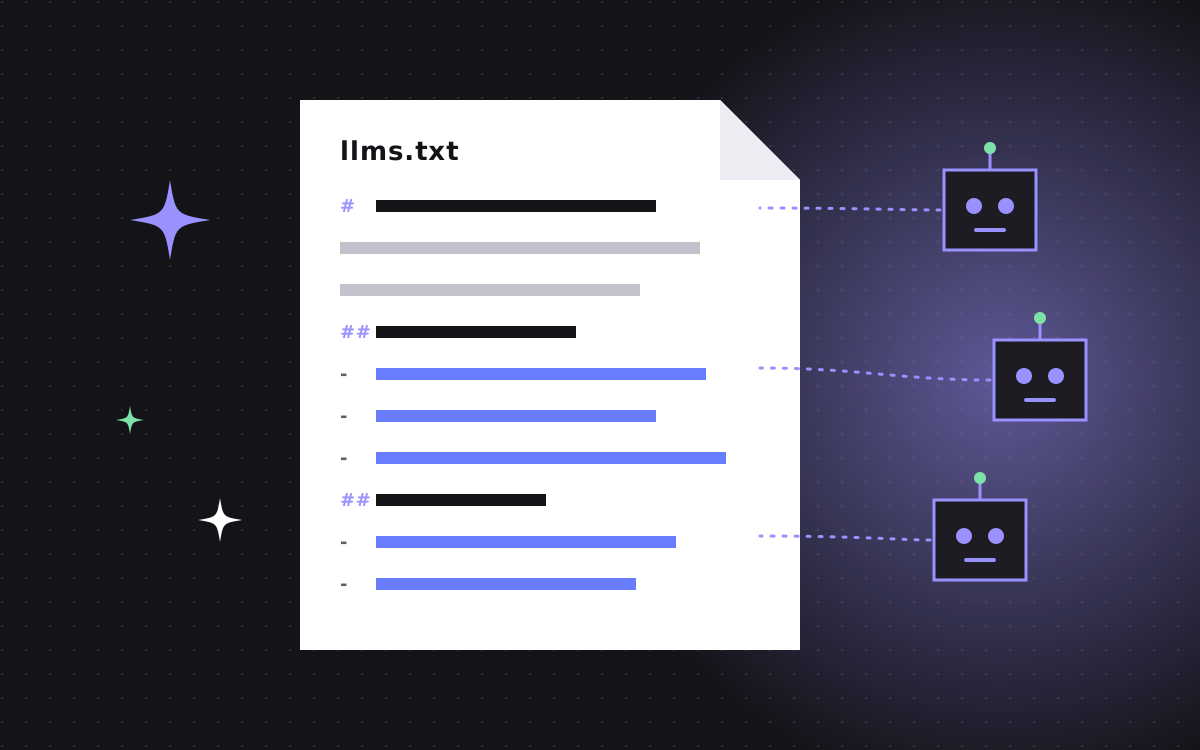
- llms.txt is a plain Markdown file at the root of your site that gives AI tools a short summary and a list of your key pages.
- It is a proposed convention, not an official standard. Support from AI companies is uneven and mostly unconfirmed.
- It takes about an hour to write, costs nothing to host and does no harm, so it is a cheap bet.
- It does not replace robots.txt, sitemaps, structured data or good content. Those matter more.
- Keep it short, factual and in sync with your site. A stale llms.txt is worse than none.
What is llms.txt?
llms.txt is a plain text file, written in Markdown, that sits at the root of your website, at /llms.txt. It gives large language models and AI tools a short summary of who you are and a curated list of your most useful pages, each with a one-line description. Think of it as a reading list for machines.
It is important to be clear about one thing up front. llms.txt is a proposed convention, not an official web standard. It was suggested in 2024 as a simple way for sites to help AI tools at the moment they read a page. Some developer tools and documentation platforms have adopted it. The big AI companies have not publicly confirmed that their crawlers or assistants rely on it. So treat it as a low-cost, low-risk extra, not as a ranking lever.
We add one to every site we build, including this one, because it takes little time and keeps our facts in one clean place. This guide explains how it works and how to write a good one.
Why llms.txt was proposed
Websites are built for people and browsers. A typical page carries navigation, cookie banners, scripts, footers and layout markup. For a language model with a limited context window, all of that is noise around the bit that matters.
The idea behind llms.txt is simple: give AI tools a clean, short entry point. Instead of crawling and parsing dozens of pages to work out what a company does, a tool could read one small file that says:
- who you are, in a sentence or two
- which pages hold the important facts
- what each of those pages covers
It is most useful when an AI tool is asked to look at a specific site, for example when someone pastes your URL into a chat and asks for a summary, or when a coding assistant reads a product's documentation.
How llms.txt differs from robots.txt and sitemap.xml
These three files are often mixed up. They do different jobs.
| File | Job | Who reads it | Status |
|---|---|---|---|
| robots.txt | Says which crawlers may visit which paths | Search and AI crawlers | Long-standing, widely respected standard |
| sitemap.xml | Lists every URL you want indexed | Search engines | Widely supported |
| llms.txt | Summarises the site and points to key pages | AI tools that choose to look for it | Proposed convention, support unconfirmed |
The key point: llms.txt does not grant or block access. If your robots.txt blocks an AI crawler, an llms.txt file will not change that. And it does not list every page. It is a short, curated guide, not a full index.
The format, step by step
The proposed format is ordinary Markdown with a light structure. In order:
- An H1 with the name of the site or company. This is the only required part.
- A blockquote with a short summary. One to three sentences that state what you do.
- Optional paragraphs with extra context, such as who you serve or key facts.
- H2 sections that group links, for example "Services", "Pricing", "Guides".
- Link lists under each H2, in the form of a Markdown link, then a colon and a short note.
- An optional section called "Optional" for links a tool can skip if it is short on space.
Some sites also publish llms-full.txt, a longer file with the full text of key pages in one place. That is a common extension, not part of the core idea. It is handy for documentation sites. For a marketing site, the short file is usually enough.
An example you can copy
Here is a trimmed version of the kind of file we write for an agency site. Replace the details with your own.
# Kookies

> Kookies is a Webflow Premium Partner and Astro agency. We design, build and migrate fast marketing websites for startups and growing teams.

Founded by Abdul Quadir. Contact: hello@kookies.io.

## Services
- [Webflow development](https://www.kookies.io/webflow-development): design and build on Webflow
- [Astro + Sanity](https://www.kookies.io/astro-sanity): fast coded sites with an easy CMS
- [WordPress to Webflow](https://www.kookies.io/wordpress-to-webflow): migrations that keep SEO

## Pricing
- [Pricing](https://www.kookies.io/pricing): landing page $500, website from $2,500, hourly $35

## Optional
- [Blog](https://www.kookies.io/blog): guides on Webflow, Astro, SEO and AEO
Notice what is not there. No marketing slogans, no long paragraphs, no list of every blog post. Just facts and the pages that prove them.
What to include, and what to leave out
Include
- A plain one-line description of what you do and for whom.
- Your main service or product pages.
- Your pricing page, if it has real numbers.
- Your about page and contact details.
- Two to five cornerstone guides that show expertise.
- Key comparison pages, if you have them.
Leave out
- Every blog post. Pick the best few.
- Thin pages, tag archives and campaign landing pages.
- Anything you would not want quoted, such as old prices.
- Claims you cannot back up. If it is not true on your site, it should not be in this file.
A good test: if a stranger read only this file, could they describe your business correctly in two sentences? If yes, it is doing its job.
How to add llms.txt to Webflow and Astro
On Astro
This is the easy one. Put a file called llms.txt in the public folder and it is served at the root on the next build. Better still, generate it from the same data files that power your pages. That way, when a price or a service changes, the file updates with it. That is how we do it on our Astro and Sanity builds.
On Webflow
Webflow's options for files at the site root have changed over time, so start by checking your site settings for a built-in option. If your plan does not offer one, common workarounds are to serve the file from a proxy or edge function in front of the site, or to host the text elsewhere and redirect /llms.txt to it. Each has trade-offs. On our Webflow builds, we pick the simplest option that keeps the file at your own domain.
Then check it
Open yourdomain.com/llms.txt in a browser. You should see plain text, not an HTML page. Make sure your robots.txt does not block the path.
Does llms.txt actually help?
Honest answer: nobody outside the AI companies knows for sure. There is no public confirmation that major AI search features use llms.txt when ranking or citing sources. Some tools, especially coding assistants and documentation helpers, do read it when pointed at a site.
Why we still add it:
- It costs an hour or so and nothing to host.
- It cannot hurt your search rankings.
- It forces you to write down your core facts clearly, which improves the rest of your site.
- If support grows, you are ready.
Do llms.txt after the basics, not instead of them. Answer-first pages, structured data, a clean sitemap and a sensible robots.txt matter far more today.
Our guide to AEO covers those basics in more detail.
Common mistakes
- Treating it like a sitemap. Listing hundreds of URLs defeats the point. Keep it to the pages that matter.
- Letting it go stale. Old prices or retired services in llms.txt give AI tools wrong facts. Update it whenever the site changes, or generate it automatically.
- Keyword stuffing. It is read by models that are good at spotting padding. Write plainly.
- Serving HTML. Some setups wrap the file in a page template. It must be plain text.
- Blocking the crawlers you want. If robots.txt blocks a bot, llms.txt will not help with that bot.
How to write yours in an hour
You do not need a developer to draft the file. Here is the process we follow.
- Write the summary first. One or two sentences: what you do, for whom, and what makes you different. If you struggle here, your home page probably needs work too.
- List your ten most important pages. Use Search Console to see which pages earn traffic, then add the pages that close deals, like pricing and case studies.
- Group them. Three or four H2 sections is plenty. Services, Pricing, Guides and Company cover most businesses.
- Write one line per link. Say what the reader will find on the page, with a concrete fact where you can. "Pricing: website from $2,500" beats "Our flexible pricing options".
- Move the nice-to-haves into Optional. Blog index, careers, press. Useful, but not core.
- Read it as a stranger. Does it describe your business correctly? Is every fact true today?
- Publish and test. Open the URL, check it is plain text, and check robots.txt does not block it.
Use full URLs, not relative paths, so the links work wherever the file is read.
Keeping it up to date
The biggest risk with llms.txt is not that it is ignored. It is that it gets old. A file that lists a service you stopped offering, or a price you changed last year, gives AI tools wrong facts with your name on them.
Two ways to avoid that:
- Generate it. On a coded site, build the file from the same data that powers your pages. Change a price once and every place updates, including llms.txt.
- Put it on a checklist. On a hosted site, add "update llms.txt" to the steps for any change to services, pricing or key pages. Review it every quarter either way.
We include this in our website launch checklist, so it is checked every time a site goes live.
Want us to set it up?
We add llms.txt, a clean robots.txt and full JSON-LD to every site we build, as part of our SEO and AEO setup. For an existing site, a one-off setup is small work, billed at $35 an hour, or folded into a care plan if you have one.
Get in touch and we will take a look at your current setup and tell you what is worth doing first.