- Start with queries and pages you already appear for. Small edits on these pages are usually the fastest work you can do.
- Filter out your brand name first, or it will flatter every number.
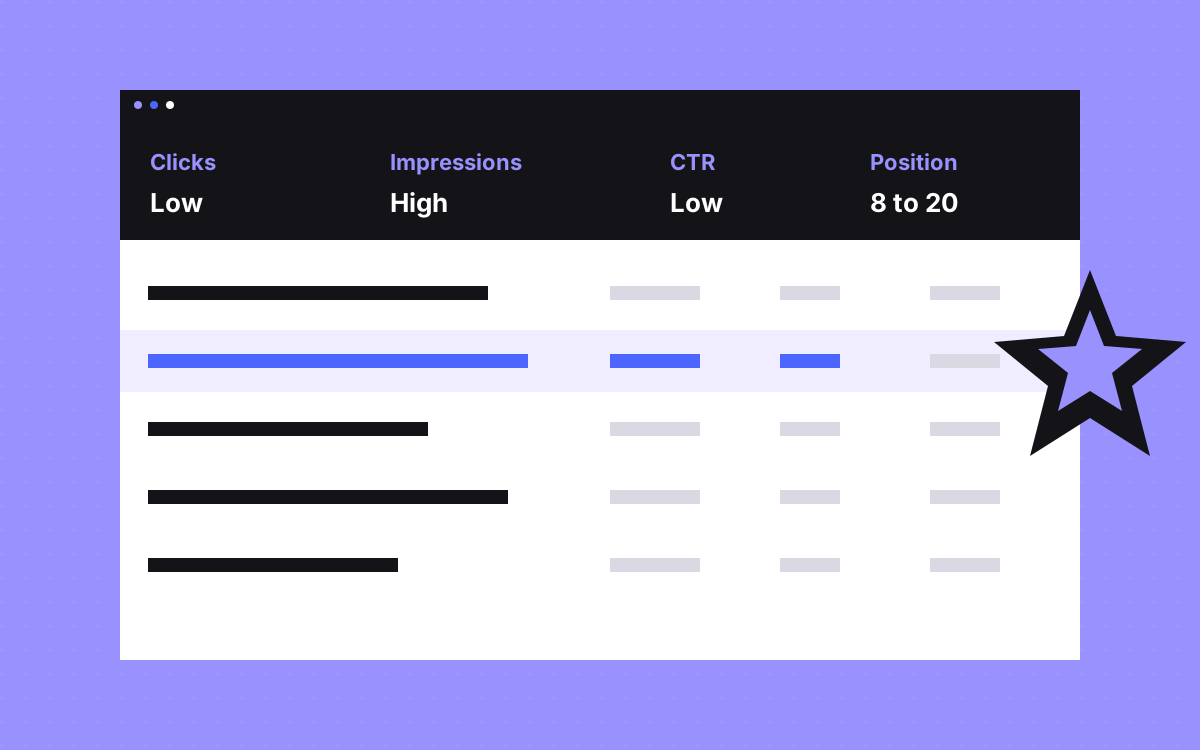
- Pages with many impressions and few clicks often need a clearer title. Pages just off the first page often need a better section and more internal links.
- Exports stop at 1,000 rows and anonymised queries are left out, so treat the data as a sample.
- Change one group of pages at a time, and write down the date.
The short answer
The quickest wins in Search Console come from pages Google already shows. Open the Performance report, exclude your brand, and look for pages with many impressions but a low click rate, and queries sitting just off the first page. Fix the title on the first group. Add a section and internal links for the second. Nothing is guaranteed, but this is the cheapest work on the list.
Read the data correctly first
- Exports are capped. Google says the most you can export from the report screens is 1,000 rows. The API and bulk export go further.
- Some queries are hidden. Anonymised queries, those used by few people, are left out of tables. This is why table rows may not add up to the chart.
- Position is a soft number. It is the average position of your topmost result. Google says clicks and impressions are the main measures.
- Recent data can move. The newest data may still change.
- Filter out your brand. Add a query filter, Custom (regex), Doesn't match regex, with
crumb|crumb aiswapped for your names.
For more on what moves rankings in general, read what actually moves rankings.
Seven filters, in the order we run them
The position ranges here are our working rule of thumb, not Google guidance. Change them to fit your site.
| # | Filter | What you find | Fix |
|---|---|---|---|
| 1 | Pages, last 3 months, sort by impressions. Turn on CTR and position. | Pages shown often with a click rate well below your other pages at a similar position | Rewrite the title and first lines |
| 2 | Queries with position between about 8 and 20 | Queries just off the first page | Add a section on that query, add internal links |
| 3 | One query at a time, then the Pages tab | Two pages sharing one query | Pick one, merge the other, add a 301 |
| 4 | Queries matching the question regex below | Questions you appear for | Answer in the first lines of a section |
| 5 | Compare last 3 months with the previous period, sort pages by Clicks Difference | Pages that lost the most | Update facts, check who now ranks above |
| 6 | Page indexing report, then URL Inspection on key pages | Money pages that are not indexed | Fix the reason shown |
| 7 | Devices tab, compared for your top pages | Pages that do far worse on mobile | Test on a real phone: layout and speed |
Filter 1: Low click rate, in detail
This is usually the fastest fix. You already appear, and people are passing you by. Look at the actual result for the main query before you write anything. Ask what the others promise that yours does not.
A made-up example:
- Before:
Services | Crumb - After:
WordPress to Webflow migration, redirects included | Crumb
The second title says who it is for and what they get. Keep your title true to the page. Two cautions from Google: it may replace a title when it detects a problem, and it builds snippets mainly from page content, using the meta description only when that describes the page better. So fix the opening lines of the page as well.
Filter 2: Just off the first page
Pick the queries that fit what you sell, then open the page that ranks for each.
- Does the page answer it? If the query only gets a passing mention, add a section with its own heading and a direct answer.
- Do other pages link to it? Add internal links from related pages, using words close to the query. Google suggests link text that makes sense by itself.
- Is it the right page? If a blog post appears for a query about buying, a service page may fit better. See search intent.
Skip queries that have nothing to do with what you sell, however close they look. A page that climbs for the wrong query brings visits that never become leads. If a query fits and you have no page that answers it well, note it down as a new page idea, and leave the existing page focused on its own job.
Regex to paste
Search Console takes regex filters on queries and pages. It uses RE2 syntax, matches part of the text by default, and ignores case.
- Questions:
^(how|what|why|when|which|can|does|is|should)\b - Buying words:
(price|pricing|cost|agency|hire|vs|alternative) - Long queries, five words or more:
^(\S+\s+){4,}\S+$ - One folder of pages:
/blog/ - Exclude your brand: Doesn't match regex, with
crumb|crumb ai
The buying list is a good place to start when time is short. Those queries often come closer to a lead than a general question does. Our post on AEO shows how to shape the answers for filter 4.
Filter 3: Two pages, one query
Do not treat every shared query as a problem. Two pages can appear together for good reason. Act when positions swap back and forth between them, or when the wrong page gets the clicks.
- Decide which page should own the query.
- Move the useful content from the other page across.
- If the other page has no reason left to exist, add a 301 redirect.
- If it stays, make its focus clearly different, and link to the main page.
How to know it worked
- Keep a change log. A simple sheet with the date, page, change and the query you care about.
- Change a small group at a time. Then compare it with pages you did not touch.
- Compare like with like. Use periods of the same length, and a year-on-year view for seasonal topics.
- Give it time. Google has to recrawl the page. Click rate changes on busy pages show sooner than ranking moves on quiet ones.
- Follow it to leads. More clicks only help if they turn into enquiries. See our tracking setup.
What is not a quick win
- Chasing queries with almost no impressions. There is too little data to tell if a change helped.
- Rewriting every title at once. You lose all ability to learn from it.
- Padding pages with the query. That makes the page worse for people.
- New pages for every variation. Often one good section does the job better. Many near-identical pages can run into thin content problems.
- Fixing every report item. Many indexing exclusions are normal. Focus on the pages you want found.
What to do next
Set aside an hour. Exclude your brand, run filter 1, pick three pages and rewrite their titles and first lines. Log the date. Next month, run filter 2. If you want us to do it, see Webflow SEO or SEO and AEO, or send us your site. We work from your own data, and we do not promise rankings.

Terms used: Google Search Console, Core Web Vitals